SPOTIFY - A NEW SOCIAL FEATURE
Client: Spotify
Role: UX Designer • Interaction Design • Visual Design
Tools:



OVERVIEW
SCOPE:
Spotify, leader on streaming music, wants to make a move into helping that connection further. It already has some core capabilities, like following artists or friends, and a basic feed of activity. However, there’s much more that can be done. There’s a few early concepts that have been talked about: Instagram-like stories, a more interactive feed, or even a better form messaging. In fact, Spotify removed the messaging capabilities earlier in 2017 due to low engagement, but instead of that there could be a chance to improve it that adds value for users.
It’s important to remark that Spotify doesn’t have the ambition of being the next social network where you share your holiday pictures and miscellaneous selfies.
CHALLENGES:
• Design a new social feature that embeds within the current Spotify platform in any device of
Android.
Design additional and complementary features that could enhance your main one.
PROCESS

Research Strategy Interaction Design UI Design
User Interviews Empathy Map Responsive Wireframes Visual Design
Market Research Persona Prototypes
Competitor Analysis Sitemap Usability Testing
Secondary Research
RESEARCH
Research Goals:
Find out if people would use Spotify:
• To post on social media?
• Use Spotify to text friends in app?
• What types of social media people are interested in using?
• Understand the user's needs and expectations when visiting and using the app?
• Understand, via competitor analysis, how other music platforms handle social features on their app.
• How and when they use Spotify?
• See if users use other music sharing platforms.
Methodologies Used:
• Secondary Research
• Competitor Analysis
• Interviews
• Market Research
Synthesizing Research
I developed a series of questions for the interview portion of my research. The interviewees were adults ranging from the ages of 18-41 yrs old.
Key takeaways from my user research:
• The majority of interviewees did not want to use Spotify to text their friends.
• They all like to discover new music.
• The majority of interviewees use Facebook and Instagram.
• They all like to share music with their friends with the exception of one person.
Two of the participants that I interviewed seemed to be along the same lines regarding
their social media usage. One participant doesn’t use social media as much as the other 3
users. The people who use social media the most are the younger ones. Three of the
interviewees use Spotify everyday while the other person uses it only once or twice a
week.
STRATEGY / SYNTHESIZING RESEARCH
Persona: With all the information and data I collected from my research I created a primary persona to help define who I am going to design for.
Erick is a student at the University of St. Thomas. He enjoys listening to music and tries to go to concerns frequently. Lately, Erick has been using Spotify as his main source of music. He really enjoys that he can discover new music through the app's playlist options that are available to everyone. Erick's friends also use Spotify and they try to share new music they find with each other.
Erick usually takes a screenshot of the song his is listening on Spotify and sends it to his friends or posts it on social media to share with his feed.
Empathy Mapping: After creating the persona, I created an empathy map to understand the user's needs, wants, perceptions, and motivations and gain empathy with our users. Interview findings helped me identify their pain points and expectations.
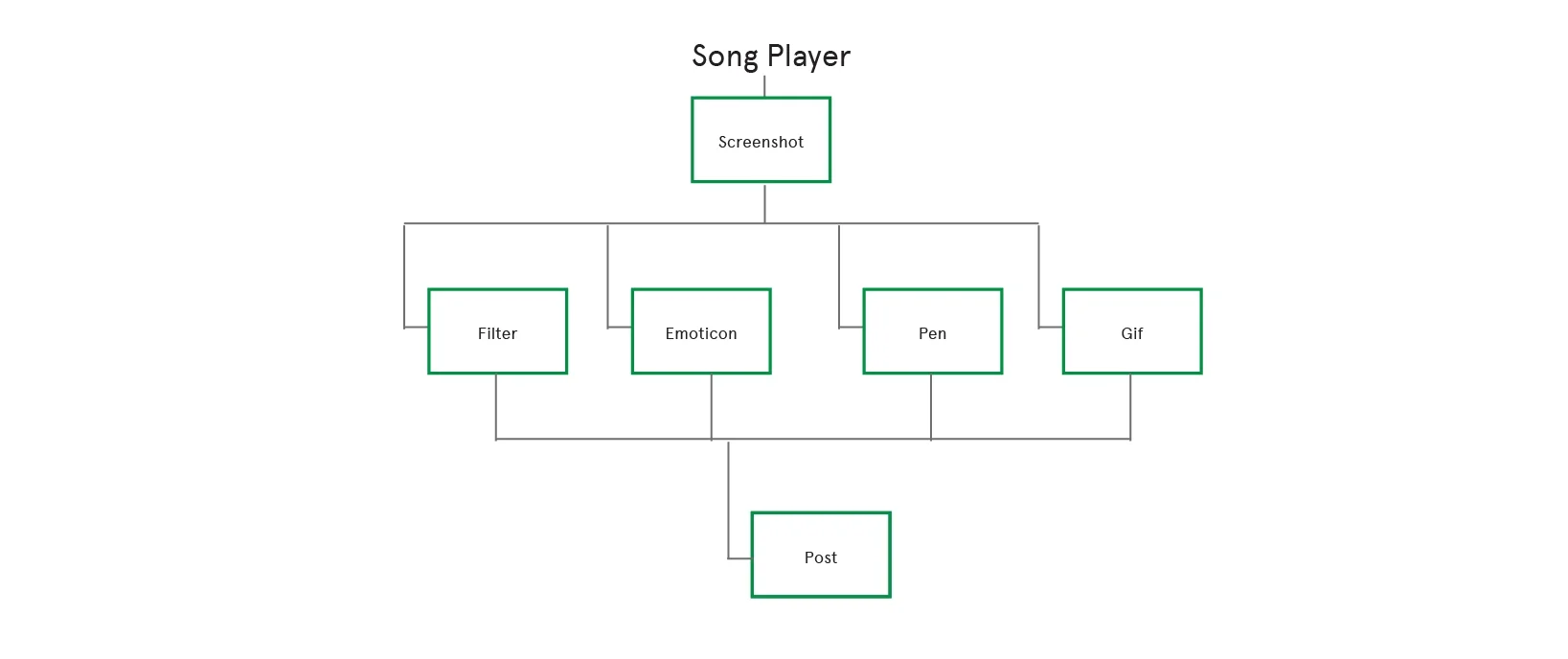
Site Map: With these results I went on to create a site map that would show the relationship between the content within the app and establish navigational categories.
INTERACTION DESIGN AND PROTOTYPING
Prior to designing the low-fidelity wireframes on the computer, I did some brainstorming. Keeping the project scope in mind, I grab manila paper, my moleskine notebook, and a pencil and I sketched out some ideas of what I visualized the new social features might look like. After this, I translated these ideas to mid fidelity wireframes.
Initial Brainstorming Low-Fidelity Wireframe Sketches
I made several sketches to brainstorm some ideas on how to implement this social feature into the app.
Although some of the sketches changed when it came time to implementing them to mid fidelity wireframes, this type of brainstorming helped me solidify my ideas and gain new potential ideas.
High fidelity mockups
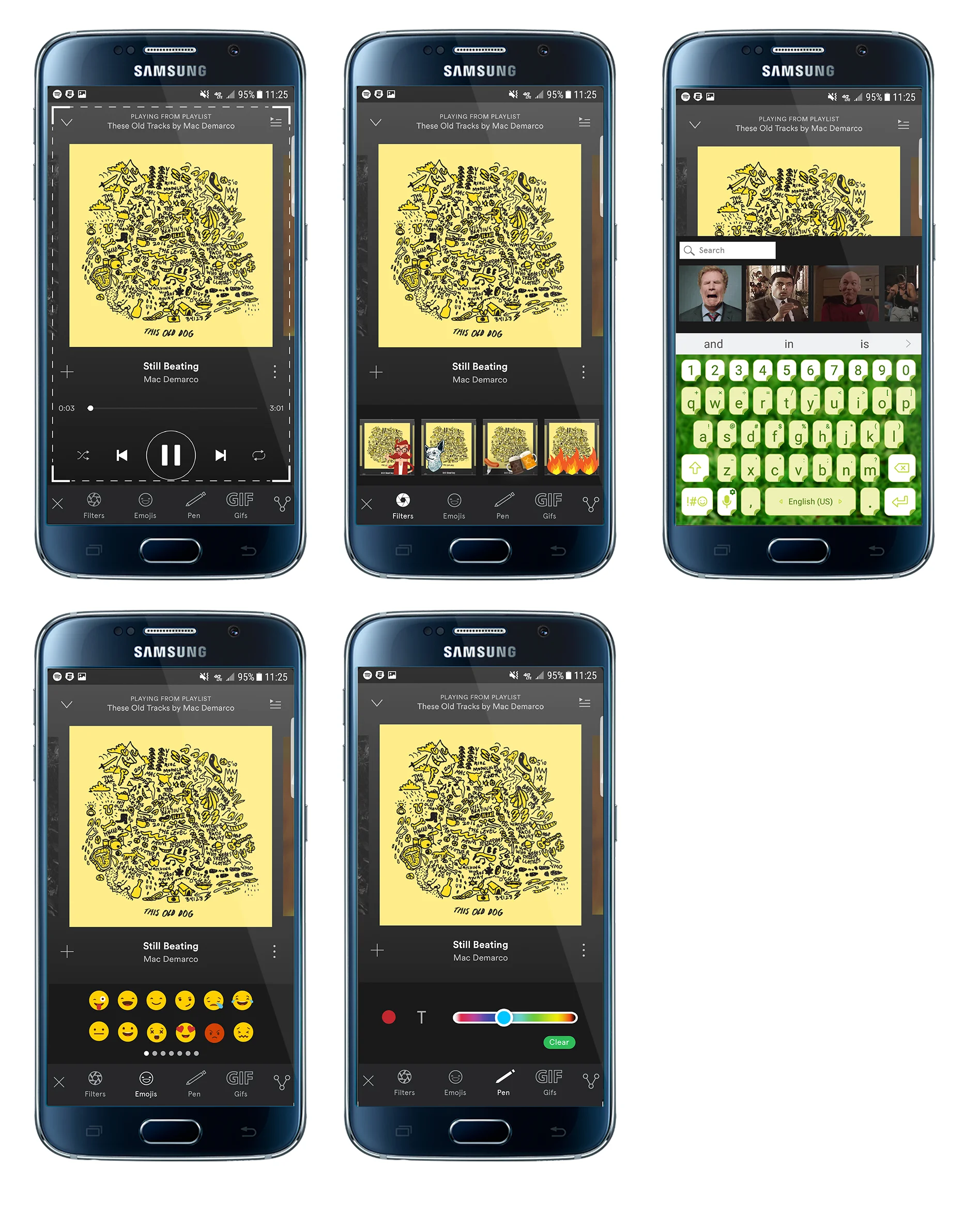
High Fidelity Prototype
I created a mid fidelity prototype using InVision.
Pages that were created: Filter, emoticon, GIF, and pen.
USABILITY TESTING
Test Objectives
• Determine if the app addition has been designed in a way that it makes the user feel
comfortable.
• How easy it is for users to accomplish taking a screen shot, adding a filter, adding an emoji then posting to facebook.
• How easy it is for users to accomplish taking a screen shot, add a gif and then post facebook.
• How pleasant it was for the user to use the app, if they want to use it, and what would make them want to use it.
Test Methodology
Testing will be done in person moderated usability test to participants between the ages of 18-41. I will be the facilitator in this case. I will be presenting the scenario and testing criteria. I will also be observing and taking notes of what is being observed during testing.
Test Goals• Users should be able to easily take a screenshot, add a filter, an emoji, and a gif and post it to social media.
Key Takeaways
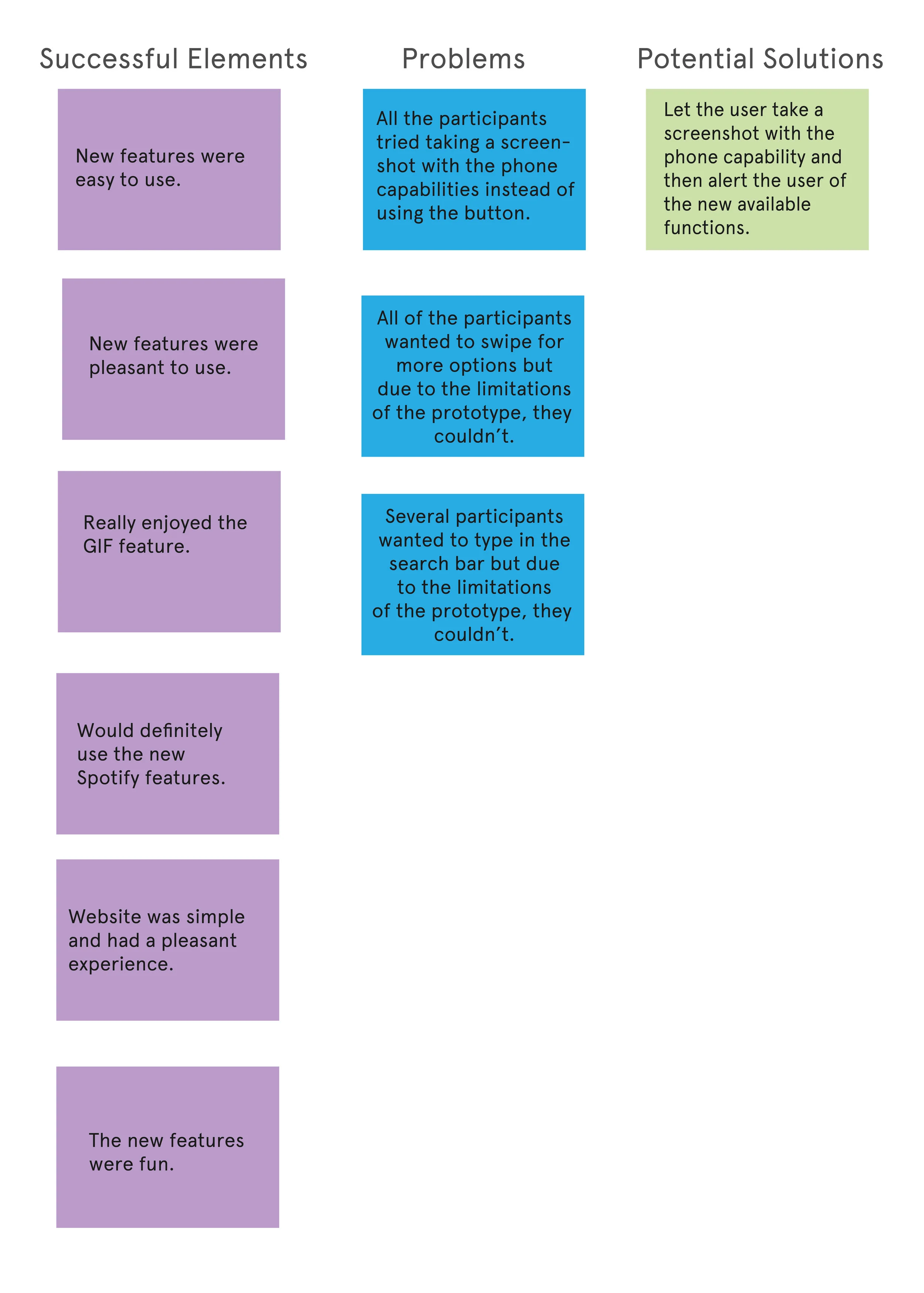
• Users found the features easy to use and pleasant.
• Instead of using the built-in screenshot button users tried using the phone capabilities to take screenshots.
Affinity Map
Conducting usability testing gave me an opportunity to observe users and see how they interacted with the app. I analyzed all the usability testing feedback from the 4 users and I organized them into an affinity map. This allowed me to identify elements that needed to be re-iterated.
CONCLUSION
Spotify is one of the leading music sharing and listening platforms. People are constantly updating their social media with everyday happenings and among those happenings one usually gets to see what kind of music they are listening to. As of right now, none of the music sharing/listening platforms allow a user to personalize a message with gifs, doodles, or filters unless you take a screenshot and adjust the pictures in another platform like instagram, snapchat or facebook. By adding this feature, not only does the user get a chance to adjust the screenshot in Spotify but they are given the opportunity to personalize it with doodles, filters, and gifs allowing them to voice more than just a static image.
By using the design process of research, strategy, design, and testing I was able to successfully achieve my project goal of designing a social feature for Spotify. Since I was working within a 4 week sprint, I limited the features to 4 and pursue the top priority needs discovered during the research and strategy phase.
From usability testing I discovered that adding a "screenshot" feature to the app was not necessary since the users inherently immediately used the phone capabilities for taking screenshots. Next steps would be to do some more usability testing to find out if this change improves the user's experience and makes it easier to use the additions to the app.
The features designed for this application were all validated through user research and refined by target audience usability testing.